Identify it, map it, tend it

Know what is growing,
and what it needs

Snap a photo to identify a plant, mushroom or insect against a curated library of 150,000+ species. Then map your garden, and Crub turns it into what is coming up, what to do next and a journal of what worked.

Free to start · works in any modern browser, on phone, tablet or computer
Identification is a confident guess, not a verdict — never eat anything on an app’s say-so.
app.crub.ai
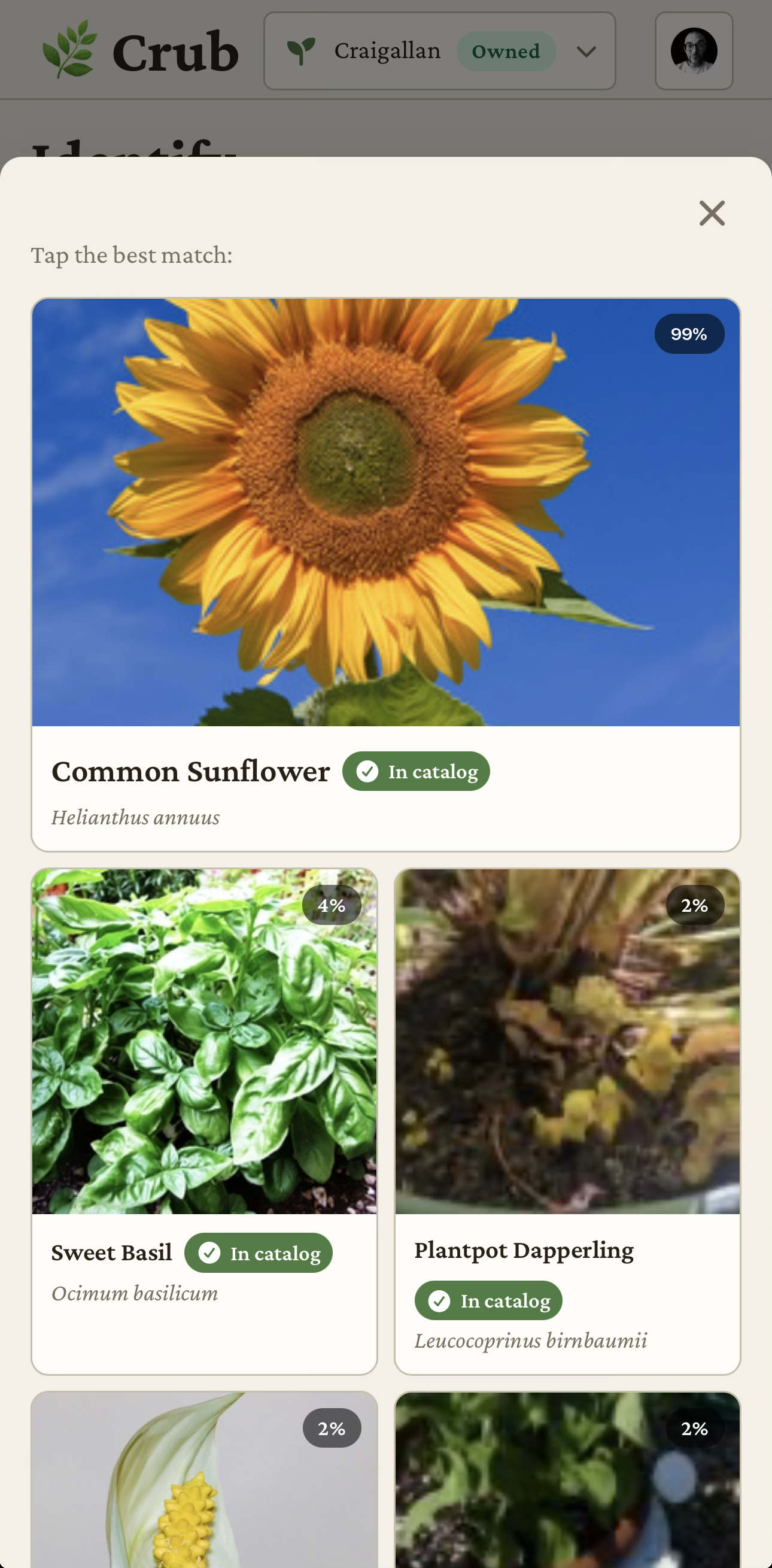
The Crub web app identifying a plant from a photo
Identified99% match

Common sunflower

Helianthus annuus

Asteraceae


In flower
Jul — Sep
Next job
Stake tall stems
Likes
Full sun · rich soil

Illustrative.

How Crub works

From a photo to knowing what to do

  1. Snap it

    Point your camera at a plant, mushroom or insect and take a Snap. A clear, well-lit photo of the leaf, flower or whole plant gives the best result.

  2. Get the name

    Crub names it against the curated species library and shows you how confident it is, rather than just asserting an answer.

  3. Tend it

    Add it to your garden and Crub turns it into care, bloom and harvest reminders — and a tidy list of what to do next.

Your garden, mapped

Every plant in its place

Lay out your garden and give every plant its spot — sketch it over a map, or capture it with your phone as you walk round, so each plant sits where it grows. Whether it is your own patch or a client’s.
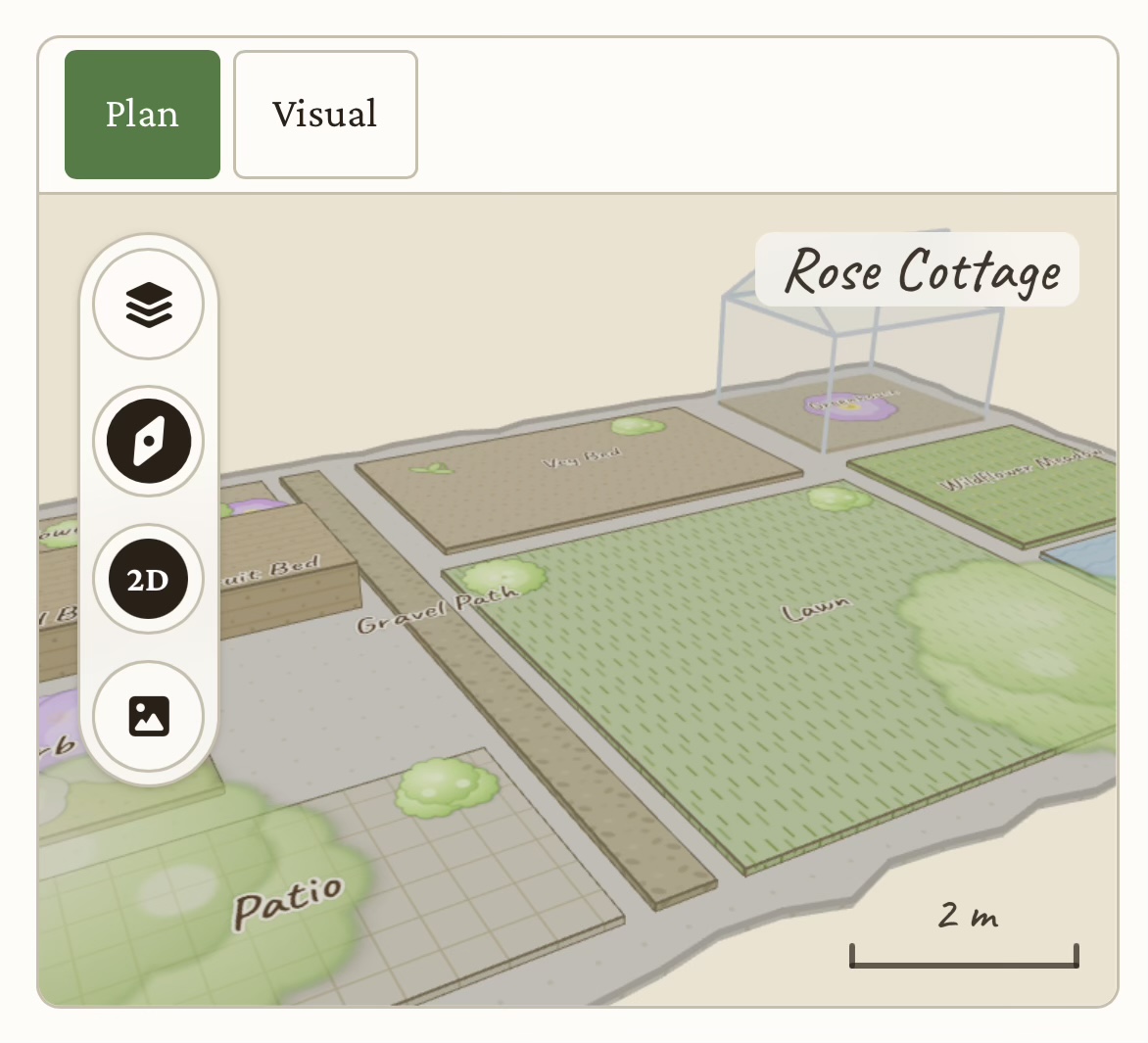
  • Sketch over a map
  • or capture it with your phone
  • your patch or a client’s
Garden map — beds, plants in place

Your gardening almanac

Know what to do, and when

Crub turns the plants you grow — and where you grow them — into seasonal care, bloom, planting and harvest calendars tuned to your part of the world.
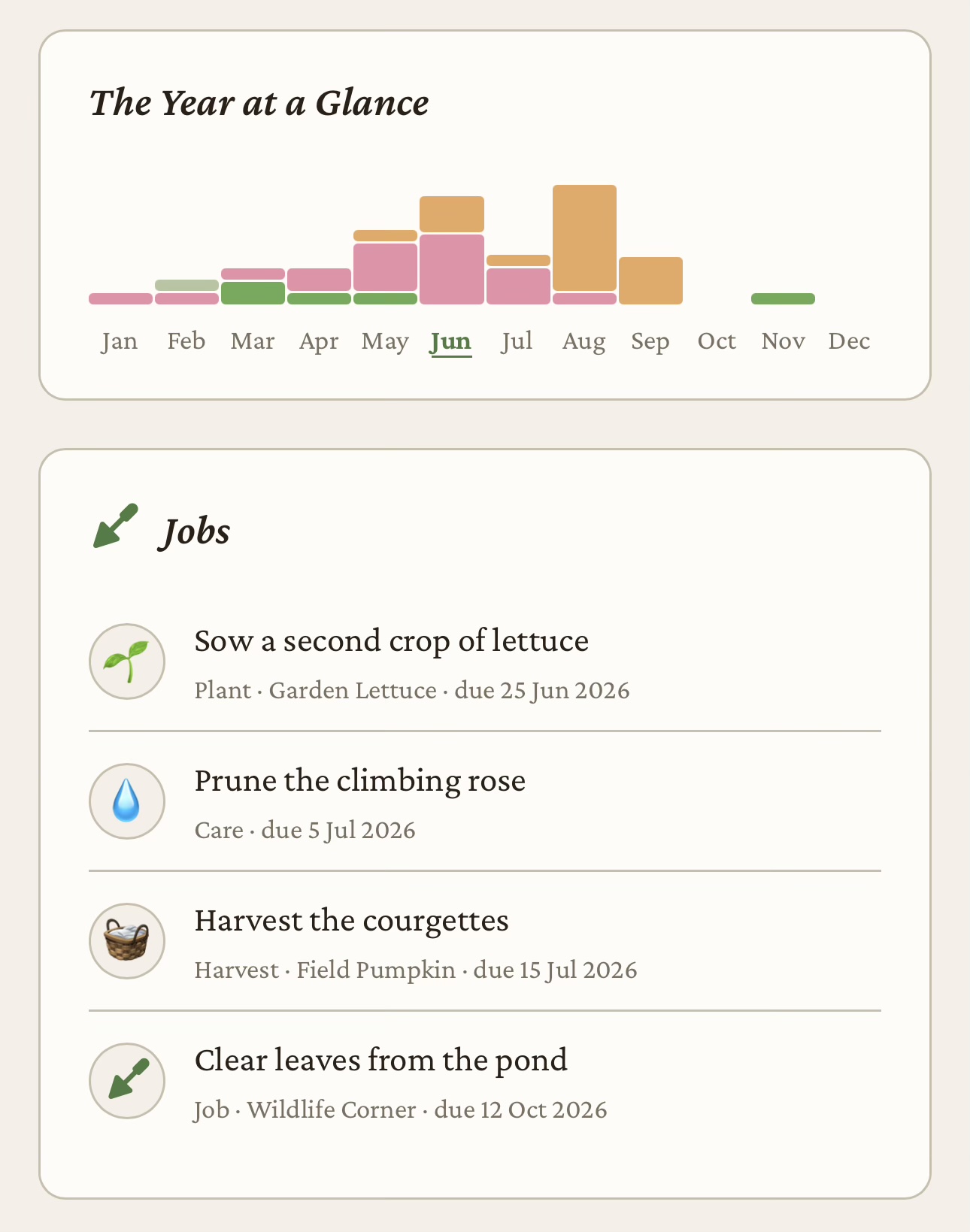
  • Feed · prune · sow · harvest
  • tuned to your region
Seasonal calendar — this month’s jobs

Recommendations

Ask what to plant, and where

Crub knows what you grow, where each thing sits and what your region does through the year. Ask it what to plant in a gap, or what would get on with the roses, and it recommends things that suit the spot, the season and what is already around them. Companions that get on, and a note on what they need from you.

Crub has not seen your garden. It knows what you have told it and what the library says, so a recommendation is a starting point rather than a plan. Check anything you would not want to get wrong — what is toxic to a pet or a child, what your area restricts, and how big the thing gets — before you dig.

Crub uses two kinds of model. Specialist image-recognition services identify what is in a photograph. A language model powers chat and recommendations: what to plant, where, and what goes well beside it. Both run outside AKdev, and both propose; neither decides. Care notes and calendars come from the library. Where AKdev uses a model.

Your whole garden

The whole garden, joined up

The library, the jobs, the notes and the seasons of your own patch, all pointing at the same plants — so what you learn in one place shows up in the others.

A curated library of 150,000+ species

Where the names come from

Plants, mushrooms and insects under their proper scientific names, with clear photographs, and care notes for the plants you can grow.

Stay on top of every job

From “I must get to that” to done

Planting, care and harvest as a plain list of jobs — each one tied to the right plant or bed, and ticked off as you go.

Learn from every season

Remember what worked

Note what you spot and what you do in one running timeline, so the story of your garden — what thrived, what struggled, what you moved — is always there to look back on.

FAQ

Frequently asked

What Crub is, how identification works and where it fits in your garden.

What is Crub?
Crub is a plant identification and garden management app. Snap a photo to identify a plant, mushroom or insect against a curated library of 150,000+ species, then map your garden and let Crub keep you on top of it with seasonal care, planting and harvest reminders. Crub works in any modern browser, on phone, tablet or computer.
How is Crub different from a plant identification app?
Crub identifies plants too, but the name is where it starts rather than where it stops. You get the name with a confidence match beside it, so you can tell how sure it is, and then Crub carries on: you put the plant where it grows on a map of your garden, and Crub turns what you grow into care, planting and harvest calendars, a list of jobs and a journal of what worked.
How does Crub identify plants from a photo?
Point your camera at a plant, mushroom or insect and take a “Snap”. Specialist image-recognition services compare the photo with Crub’s curated library of 150,000+ species and return the most likely identification, along with a confidence match so you know how sure it is. Clear, well-lit photos of leaves, flowers or the whole plant give the most reliable results.
What can Crub identify?
Crub identifies plants, mushrooms and insects, against a curated library of 150,000+ species with proper scientific names and clear photos. For plants you can grow, it also carries notes on how to look after them.
How accurate is Crub’s identification?
Each identification comes with a confidence match and is drawn from a curated reference library. The match tells you how sure Crub is; it is not a guarantee. Accuracy is highest when the plant, mushroom or insect is clearly in frame and well lit. For anything you plan to eat or forage, always confirm with an expert before relying on an app.
Can I ask Crub what to plant?
Yes. Crub has a chat that knows your garden: what you grow, where each plant sits and what your region does through the year. Ask what to plant in a gap, where something would do best or what goes well beside it, and it recommends plants to suit. The chat and its recommendations come from a language model, so treat a recommendation as a starting point: Crub has not seen your garden. The care notes and calendars come from the curated library.
Is Crub free to use?
Yes. Crub’s free Sprout plan lets you map one garden and take 5 identifications (Snaps) a month at no cost, and it is not time-limited. Paid plans add more Snaps and sharing, and Orchard adds more gardens: Bloom is £5 a month and Orchard is £35 a month, both cheaper when billed yearly, and each with a seven-day free trial.
What devices does Crub work on?
Crub works in any modern browser, on phone, tablet or computer.
Can Crub help me manage my whole garden, not just identify plants?
Yes. Beyond identification, Crub lets you map your garden and give every plant its place, then turns what you grow into seasonal care, bloom, planting and harvest calendars tuned to your region. It builds a simple to-do list of jobs and keeps a running journal so you can learn from each season.
Can professional gardeners use Crub for multiple clients?
Yes. Crub’s Orchard plan is for professionals who tend many gardens: map up to 5 client gardens (add more for £5 each a month), keep a living record of what is planted where, and see the right week for each job across every garden you look after.
Can I use Crub with Claude or ChatGPT?
Yes, on a paid plan: Bloom and Orchard. Crub has an MCP server at https://mcp.crub.ai/mcp. Add it as a connector in Claude, ChatGPT or another assistant that speaks the Model Context Protocol, sign in with your Crub account, and your assistant can work with Crub as you — with your access and within your plan. What it can do is listed at https://crub.ai/mcp.

Free to start

File your first find

Identify something, map the bed it is in, and see what Crub tells you to do next. The free plan has no time limit, and Bloom and Orchard each start with a seven-day free trial.